HappyEverAfter Developer Guide
Table of Contents
- HappyEverAfter Developer Guide
Acknowledgements
Libraries used: Checkstyle, JUnit, JavaFX References used: SE-EDU initiative, AB3
Special thanks to our tutor, Kim Hyeongcheol
Setting up, getting started
Refer to the guide Setting up and getting started.
Design
Architecture
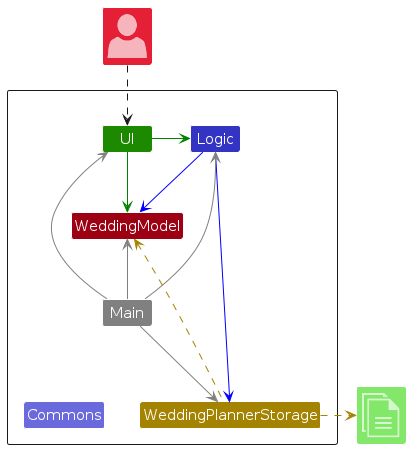
The Architecture Diagram given above explains the high-level design of the App.
Given below is a quick overview of main components and how they interact with each other.
Main components of the architecture
Main (consisting of classes Main and MainApp) is in charge of the app launch and shut down.
- At app launch, it initializes the other components in the correct sequence, and connects them up with each other.
- At shut down, it shuts down the other components and invokes cleanup methods where necessary.
The bulk of the app's work is done by the following four components:
UI: The UI of the App.Logic: The command executor.WeddingModel: Holds the data of the App in memory.Storage: Reads data from, and writes data to, the hard disk.
Commons represents a collection of classes used by multiple other components.
How the architecture components interact with each other
The Sequence Diagram below shows how the components interact with each other for the scenario where the user issues the command delete 1.
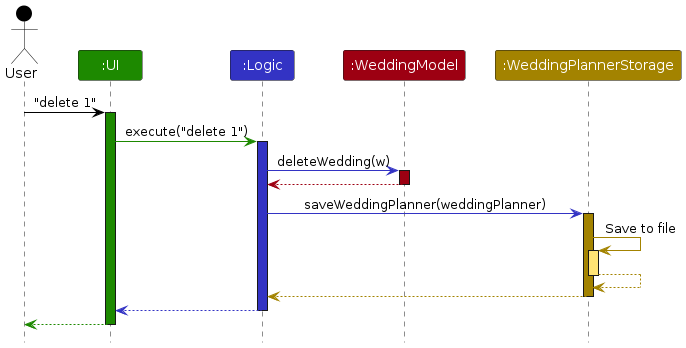
Each of the four main components (also shown in the diagram above),
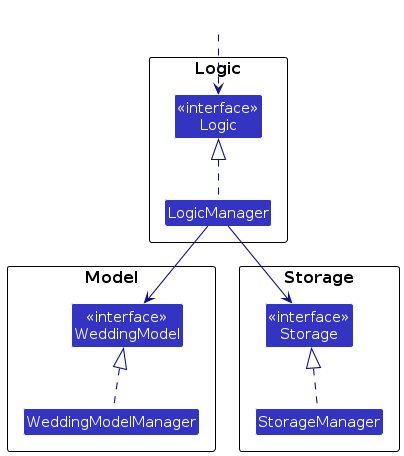
- defines its API in an
interfacewith the same name as the Component. - implements its functionality using a concrete
{Component Name}Managerclass (which follows the corresponding APIinterfacementioned in the previous point.
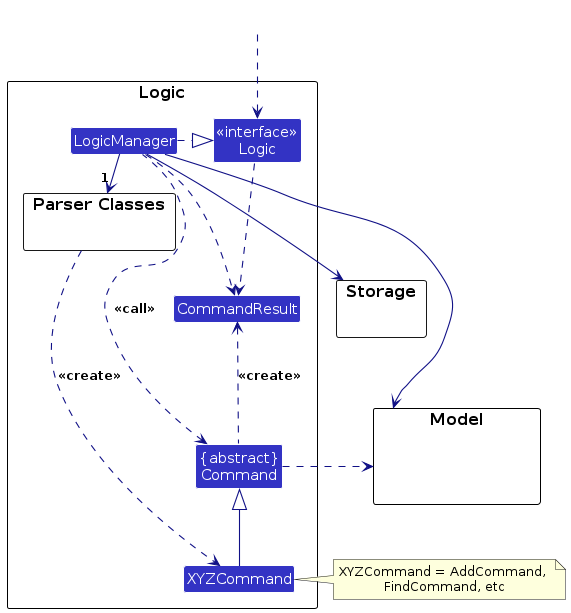
For example, the Logic component defines its API in the Logic.java interface and implements its functionality using the LogicManager.java class which follows the Logic interface. Other components interact with a given component through its interface rather than the concrete class (reason: to prevent outside component's being coupled to the implementation of a component), as illustrated in the (partial) class diagram below.
The sections below give more details of each component.
UI component
The API of this component is specified in Ui.java
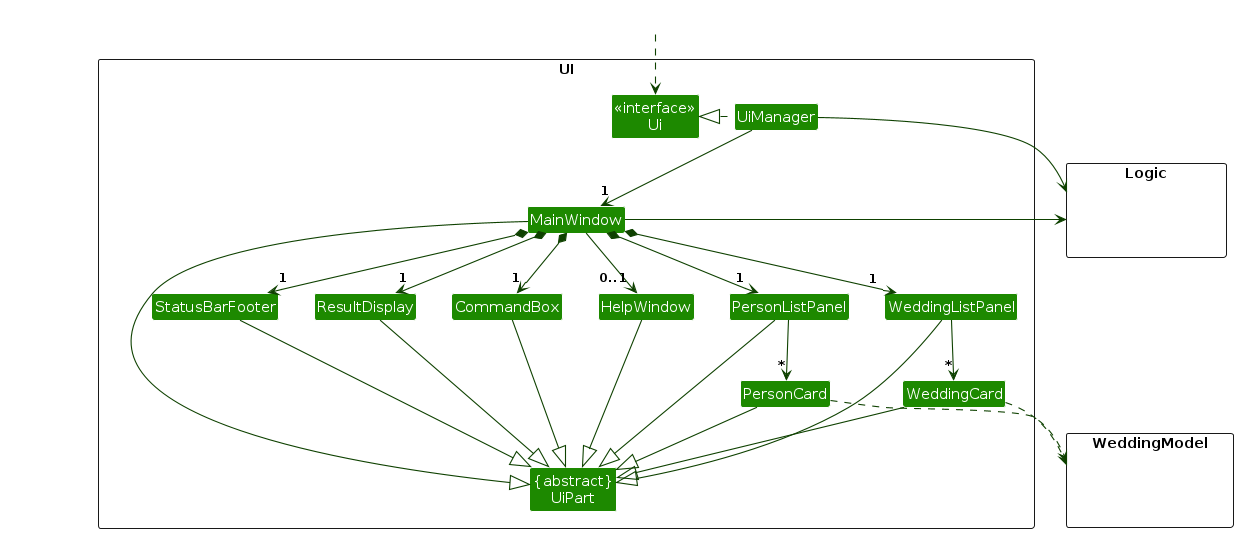
The UI consists of a MainWindow that is made up of parts e.g.CommandBox, ResultDisplay, PersonListPanel, WeddingListPanel StatusBarFooter etc. All these, including the MainWindow, inherit from the abstract UiPart class which captures the commonalities between classes that represent parts of the visible GUI.
The UI component uses the JavaFx UI framework. The layout of these UI parts are defined in matching .fxml files that are in the src/main/resources/view folder. For example, the layout of the MainWindow is specified in MainWindow.fxml
The UI component,
- executes user commands using the
Logiccomponent. - listens for changes to
WeddingModeldata so that the UI can be updated with the modified data. - In particular, it listens for changes to the
UniqueWeddingList, as well as theUniquePersonListof the currently open wedding. - keeps a reference to the
Logiccomponent, because theUIrelies on theLogicto execute commands. - depends on some classes in the
Modelcomponent, as it displaysWeddingobjects residing in theModel, as well as thePersonobjects stored in theWedding as well.
Logic component
API : Logic.java
Here's a (partial) class diagram of the Logic component:
The sequence diagram below illustrates the interactions within the Logic component, taking execute("delete 1") API call as an example.
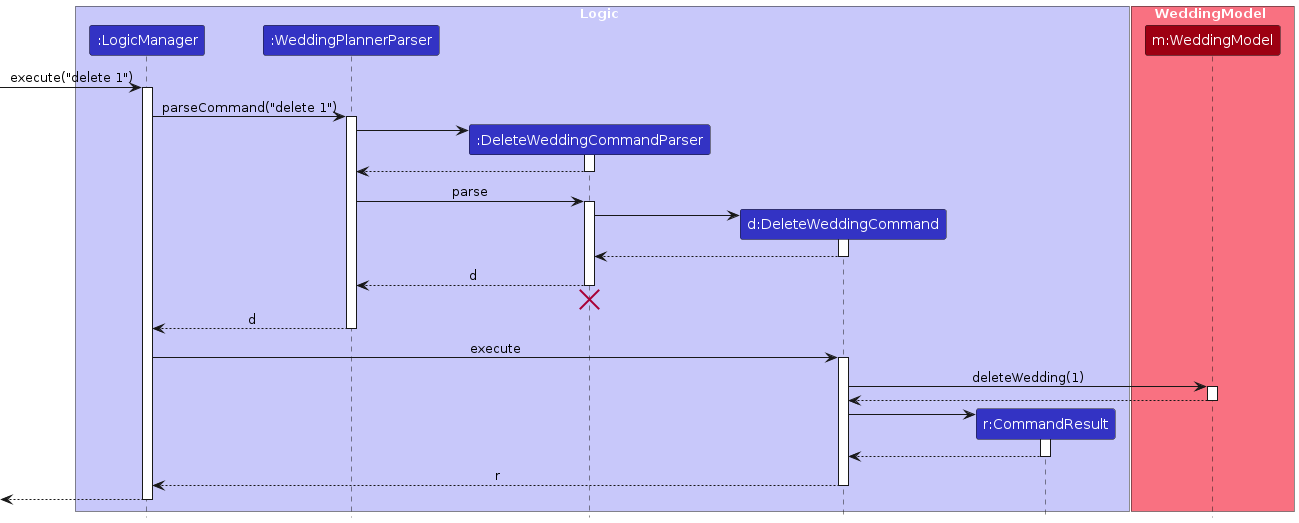
Note: The lifeline for DeleteCommandParser should end at the destroy marker (X) but due to a limitation of PlantUML, the lifeline continues till the end of diagram.
How the Logic component works:
- When
Logicis called upon to execute a command, it is passed to anWeddingPlannerParserobject which in turn creates a parser that matches the command (e.g.,DeleteCommandParser) and uses it to parse the command. - This results in a
Commandobject (more precisely, an object of one of its subclasses e.g.,DeleteCommand) which is executed by theLogicManager. - The command can communicate with the
Modelwhen it is executed (e.g. to delete a wedding).
Note that although this is shown as a single step in the diagram above (for simplicity), in the code it can take several interactions (between the command object and theModel) to achieve. - The result of the command execution is encapsulated as a
CommandResultobject which is returned back fromLogic.
Here are the other classes in Logic (omitted from the class diagram above) that are used for parsing a user command:
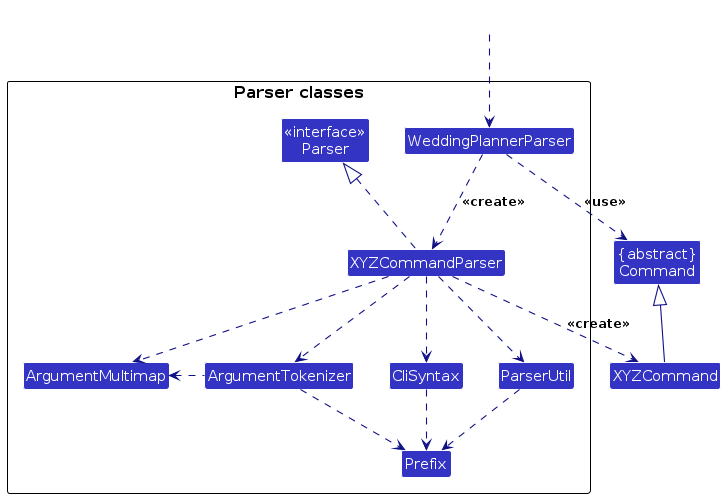
How the parsing works:
- When called upon to parse a user command, the
WeddingPlannerParserclass creates anXYZCommandParser(XYZis a placeholder for the specific command name e.g.,AddWeddingCommandParser) which uses the other classes shown above to parse the user command and create aXYZCommandobject (e.g.,AddWeddingCommand) which theWeddingPlannerParserreturns back as aCommandobject. - All
XYZCommandParserclasses (e.g.,AddWeddingCommandParser,DeleteCommandParser, ...) inherit from theParserinterface so that they can be treated similarly where possible e.g, during testing.
WeddingModel component
API : WeddingModel.java
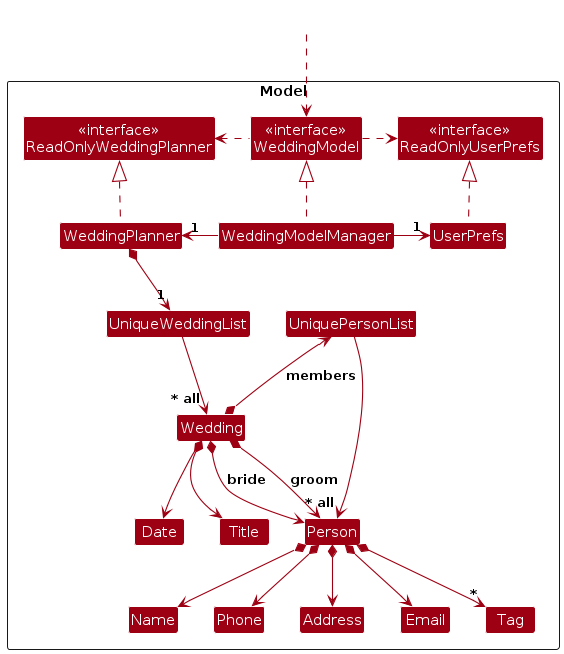
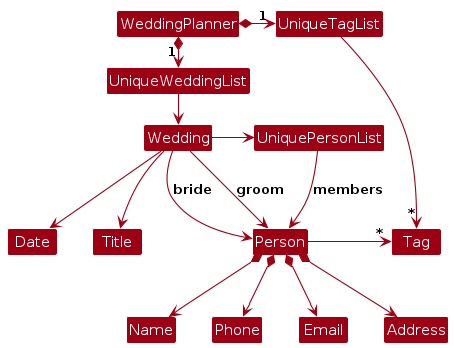
The WeddingModel component,
- stores the wedding planner data i.e., all
Weddingobjects (which are contained in aUniqueWeddingListobject) and allPersonobjects (which are contained in eachWeddingobject'sUniquePersonList) - exposes the data to the outside as
ReadOnlyWeddingPlannerobjects that can be 'observed' e.g. the UI can be bound to this list so that whe each wedding is selected, the UI updates to show the selected Wedding's data i.e., all thePersonobjects within it - stores the currently 'selected'
Weddingobjects (e.g., results of a search query) as a separate filtered list which is exposed to outsiders as an unmodifiableObservableList<Wedding>that can be 'observed' e.g. the UI can be bound to this list so that the UI automatically updates when the data in the list change. - stores a
UserPrefobject that represents the user’s preferences. This is exposed to the outside as aReadOnlyUserPrefobjects. - does not depend on any of the other three components (as the
WeddingModelrepresents data entities of the domain, they should make sense on their own without depending on other components)
Key Model Classes
- WeddingPlanner: The central data structure that holds all weddings
- Wedding: Represents a wedding event with the following properties:
date: The scheduled date for the weddingtitle: The name/title of the weddingbride: A reference to a Person representing the bridegroom: A reference to a Person representing the groommembers: A UniquePersonList of other people involved in the wedding
- WeddingModel: Extends the base AB3 Model interface with wedding-specific operations
- WeddingModelManager: The implementation of the WeddingModel interface that:
- Manages the current wedding context (the active wedding being edited)
- Handles draft wedding creation and commitment
- Provides operations for adding, editing, and removing people from weddings
Note: An alternative (arguably, a more OOP) model is given below. It has a Tag list in the WeddingPlanner, which Person references. This allows WeddingPlanner to only require one Tag object per unique tag, instead of each Person needing their own Tag objects.
Storage component
API : Storage.java
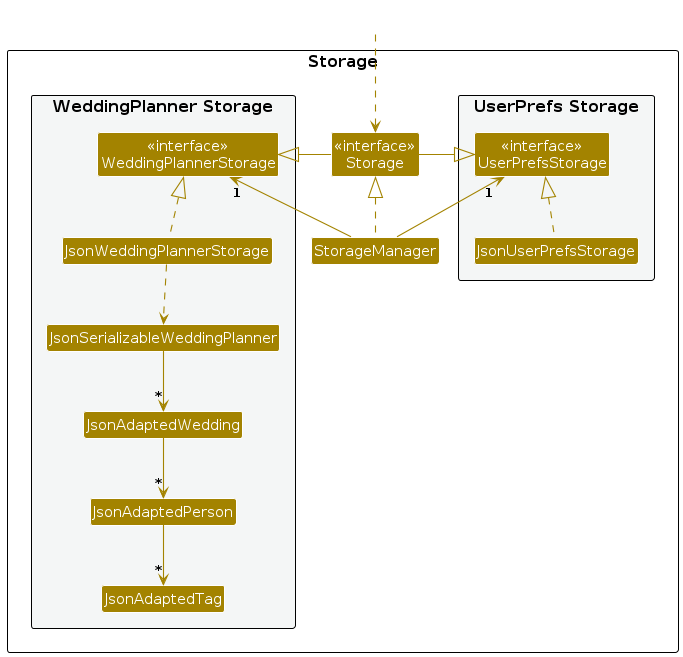
The Storage component,
- can save both wedding planner data and user preference data in JSON format, and read them back into corresponding objects.
- inherits from both
WeddingPlannerStorageandUserPrefStorage, which means it can be treated as either one (if only the functionality of only one is needed). - depends on some classes in the
WeddingModelcomponent (because theStoragecomponent's job is to save/retrieve objects that belong to theWeddingModel)
Common classes
Classes used by multiple components are in the seedu.address.commons package.
Documentation, logging, testing, configuration, dev-ops
Appendix: Requirements
Product scope
Target user profile:
- Has a need to manage a significant number of contacts over a variety of different weddings
- Prefers desktop apps over other types
- Can type fast
- Prefers typing to mouse interactions
- Is reasonably comfortable using CLI apps
Value proposition: Allows the user to manage wedding tasks faster and more effectively than a typical mouse/GUI driven app or manually.
User stories
Priorities: High (must have) - * * *, Medium (nice to have) - * *, Low (unlikely to have) - *
| Priority | As a … | I want to … | So that I can… |
|---|---|---|---|
* * * | new user | see usage instructions | refer to instructions when I forget how to use the App |
* * * | user | create a new wedding folder with a unique name | organize wedding details separately |
* * * | user | delete a wedding | remove unwanted weddings |
* * * | user | open a wedding | manage its details |
* * * | user | close an open wedding | open a different wedding |
* * * | user | sort weddings by date | easily view upcoming weddings in chronological order and plan accordingly |
* * * | user | add a new person’s contact details to a wedding | track attendees and their information |
* * | user | tag people with roles | associate certain contacts with their roles |
* * | user | find a person by name | quickly locate their details |
* | user | search using partial name matching | find people even if I don’t remember their full name |
* * | user | filter search results by guests, staff, or couple | narrow down results |
* * * | user | delete a person from a wedding | remove incorrect or outdated entries |
* | user | be asked for confirmation before deletion | avoid deleting someone by mistake |
* * | user | have my wedding data saved automatically | avoid losing my progress |
* * * | user | retrieve my saved data when restarting the app | continue managing weddings from where I left off |
* * * | user | have data persist even after closing the app | ensure my information remains intact |
Use cases
(For all use cases below, the System is the HappyEverAfter and the Actor is the user, unless specified otherwise)
Use case: Creating a new wedding
MSS
User creates a new wedding
HappyEverAfter provides confirmation that the wedding has been created
Use case ends.
Extensions
1a. There exists a wedding with the same name.
1ai.HappyEverAfter shows an error message.
Use case resumes at step 1.
Use case ends.
1b. Wedding name provided is in an invalid format.
1bi. HappyEverAfter shows an error message.
Use case resumes at step 2.
Use case: Adding a person to a wedding
MSS
User requests to list weddings
HappyEverAfter shows a list of weddings
User opens the wedding they want
HappyEverAfter provides confirmation that the wedding has been opened
User adds contact information of person
HappyEverAfter acts the person to that wedding.
Use case ends.
Extensions
2a. The list is empty.
Use case ends.
5a. Contact information provided is in an invalid format.
5ai. HappyEverAfter shows an error message.
Use case resumes at step 2.
Use case: Delete a person from a wedding
MSS
User requests to list weddings
HappyEverAfter shows a list of weddings
User opens the wedding they want
HappyEverAfter provides confirmation that the wedding has been opened
User requests to list persons associated with that wedding
HappyEverAfter shows a list of persons
User requests to delete a specific person in the list
HappyEverAfter deletes the person
Use case ends.
Extensions
2a. The list is empty.
Use case ends.
5a. The list is empty.
Use case ends.
7a. The given index is invalid.
7a1. HappyEverAfter shows an error message.
Use case resumes at step 6.
{More to be added}
Non-Functional Requirements
- Should work on any mainstream OS as long as it has Java
17or above installed. - Should be able to hold up to 1000 weddings without a noticeable sluggishness in performance for typical usage.
- A user with above average typing speed for regular English text (i.e. not code, not system admin commands) should be able to accomplish most of the tasks faster using commands than using the mouse.
- Data loss should not occur even in the event of an unexpected shutdown (e.g., GUI crash).
- The system should be modular, allowing for easy addition or removal of features without affecting existing functionality.
- All data should be stored locally on the user's device, and users should be able to access and modify their data without any delays caused by network connectivity.
- The system should perform input validation and generate a response within 500 milliseconds for each user input to ensure a smooth and responsive user experience.
Glossary
- Mainstream OS: Windows, Linux, Unix, MacOS
- Client: A couple or individual using the wedding planner’s services to organize their wedding
- Vendor: A service provider (e.g., caterers, florists, photographers) who collaborates with the wedding planner
- Invitation: A digital or physical wedding invitation managed and tracked within the system
- Event Timeline: A structured schedule outlining key wedding milestones and deadlines
- Vendor Coordination: The process of managing communication and contracts with wedding vendors
- Reminder Notifications: Automated alerts to keep planners on schedule with tasks
- Error Message: A message displayed when an invalid operation occurs
Appendix: Instructions for Manual Testing
Given below are instructions to test the app manually.
Note: These instructions provide a starting point for testers; testers are expected to perform additional exploratory testing.
Launch and Shutdown
Initial Launch
Prerequisites: Ensure that Java 17 or above is installed on your computer.
Test Case: Download the
happyeverafter.jarfile and place it in an empty folder.Execution: Double-click the
happyeverafter.jarfile.Expected Outcome: The GUI launches displaying a set of sample weddings. The window size may not be optimal.
Saving Window Preferences
Test Case: Resize the application window to an optimal size and move it to a preferred location. Close the application.
Execution: Re-launch the application by double-clicking the
happyeverafter.jarfile.Expected Outcome: The application window retains the most recent size and location.
Exiting the Application
Test Case: Click the close button on the application window or enter the
exitcommand in the command box.- Expected Outcome: The application shuts down gracefully without any error messages.
Adding a Wedding
Adding a Wedding to HappyEverAfter
Prerequisites: The application must be running.
Test Case: Enter the command
new n/John & Mary d/09092027.- Expected Outcome: A new wedding named "John & Mary" with the date 09 September 2027 is created. The application prompts for the contact details of the bride and groom.
Test Case: Enter the command
new n/John & Mary.- Expected Outcome: No wedding is created. An error message is displayed indicating the missing date parameter.
Test Case: Enter the command
new n/John & Mary d/31-02-2027.- Expected Outcome: No wedding is created. An error message is displayed indicating the invalid date format.
Other Incorrect
newCommands to Try:newnew n/John & Mary d/new d/09092027Expected Outcome: Similar to previous cases, no wedding is created, and appropriate error messages are displayed.
Managing Weddings
Listing All Weddings
Prerequisites: At least one wedding has been added to the application.
Test Case: Enter the command
list.- Expected Outcome: A list of all weddings is displayed, showing their names and dates.
Sorting Weddings by Date
Prerequisites: Multiple weddings with different dates have been added.
Test Case: Enter the command
sort.- Expected Outcome: The list of weddings is sorted in ascending order by date.
Deleting a Wedding
Prerequisites: At least one wedding exists in the application.
Test Case: Enter the command
delete 1.- Expected Outcome: The first wedding in the list is deleted. The list updates to reflect the change.
Test Case: Enter the command
delete 0ordeletewith an invalid index.- Expected Outcome: No wedding is deleted. An error message is displayed indicating the invalid index.
Deleting All Weddings
Prerequisites: Multiple weddings exist in the application.
Test Case: Enter the command
clear.- Expected Outcome: All weddings are deleted from the application. The list becomes empty.
Managing Members
Adding a Person to a Wedding
Prerequisites: At least one wedding exists. The wedding is currently open in the application.
Test Case: Enter the command
add n/Emily Tan p/91234567 e/emily@example.com r/Bride.- Expected Outcome: A person named "Emily Tan" with the specified contact details and role "Bride" is added to the current wedding.
Test Case: Enter the command
add n/Emily Tan p/91234567 e/emily@example.com.- Expected Outcome: No person is added. An error message is displayed indicating the missing role parameter.
Other Incorrect
addCommands to Try:add n/Emily Tan e/emily@example.com r/Brideadd p/91234567 e/emily@example.com r/Brideadd n/Emily Tan p/91234567 r/BrideExpected Outcome: Similar to previous cases, no person is added, and appropriate error messages are displayed.
Searching for Members of Weddings
Prerequisites: Multiple members have been added to the current wedding.
Test Case: Enter the command
find Emily.- Expected Outcome: A list of members whose names contain "Emily" is displayed.
Test Case: Enter the command
find.- Expected Outcome: No members are displayed. An error message is shown indicating the missing search keyword.
Filtering Members by Tags
Prerequisites: Members have been tagged with specific labels (e.g., "family", "friend").
Test Case: Enter the command
filter t/family.- Expected Outcome: A list of members tagged with "family" is displayed.
Test Case: Enter the command
filter t/unknown.- Expected Outcome: No members are displayed. A message indicates that no members have the specified tag.
Editing a Person
Prerequisites: At least one member exists in the current wedding.
Test Case: Enter the command
edit 1 p/98765432.- Expected Outcome: The phone number of the first member in the list is updated to "98765432".
Test Case: Enter the command
edit 1.- Expected Outcome: No changes are made. An error message is displayed indicating the missing fields to edit.
Removing a Person
Prerequisites: At least one member exists in the current wedding.
Test Case: Enter the command
remove 1.- Expected Outcome: The first member in the list is removed from the wedding.
Test Case: Enter the command
remove 0orremovewith an invalid index.- Expected Outcome: No member is removed and an appropriate error message is displayed.
Saving Data
Dealing with Missing/Corrupted Data Files
Simulating a Missing Data File:
Execution: Navigate to the application's data directory and delete the data file (i.e. data/weddingplanner.json).
Test Case: Launch the application after deleting the data file.
- Expected Outcome: The application starts with an sample list of weddings. A new data file by the same name is created upon exiting the application.
Simulating a Corrupted Data File:
Execution: Open the data file in a text editor and intentionally break its format (e.g., delete a brace, alter tags, insert random characters).
Test Case: Launch the application after corrupting the file.
- Expected Outcome: The application detects the corrupted file and logs that as the datafile could not be loaded, a new and empty file has been created.
- User can then manually fix the crropted file or input their wedding details from scratch.
Verifying Data Persistence After Application Restart
Prerequisites: The application is running and at least one wedding has been added.
Test Case: Close the application and re-launch it.
- Expected Outcome: All previously entered data (weddings, people, preferences) are correctly loaded and displayed.
Appendix: Planned enhancements
This team consists of 5 members.
Flexible Date Parsing
Currently, the
DATEfield required by thenewcommand only accepts one date input format. In the future, more support for different date formats such as the ISO8601 standard (2002-06-11), or Mon-DD-YYYY (Jun-11-2002).International Phone Numbers
The
PHONE_NUMBERfield in theaddcommand only accepts numbers, which can be restrictive for international numbers. We plan to allow spaces and characters such as+-()for more flexibility when adding numbers.Regex parsing for find and filter
We plan to support regex parsing to allow users to more robustly match the tags or search parameters.
Flexible tags
Currently,
TAGSare limited only to alphanumeric characters. We plan to allow more characters such as spaces and special characters to provide users more flexibility in the tags they can add to people.Warn on duplicate info
Currently, the
newcommand allows weddings with the same name, but different date to be added, as well as weddings with the same name, with varying amount of spaces. We plan to display a warning if similar duplicates are found, so that users can notice and correct the errors if unintended.More flexible names
Currently, the
NAMEfield does not support some common characters such as/. We plan to add support for these characters in the future.